Marketing automation is software that handles repetitive marketing tasks based on customer actions, so a form submission can trigger an instant follow-up email, a CRM update, and the next step in your sales process without anyone doing it by hand. In the UK, that matters because there were about 5.5 million private sector businesses in 2023, 87% had at least basic digital capability, but only 31% had advanced digital capability, which is exactly where automation starts to separate a basic online presence from a system that turns clicks into enquiries and revenue.
If you're running a clinic, bakery, café, roofing company, or any other local business, the problem usually isn't a lack of interest. It's what happens next. Enquiries come in through your website, Instagram, email, contact forms, and Google Business Profile. Someone means to reply. Someone forgets. A lead goes cold. A customer who was ready to book drifts off to a competitor who answered faster.
That's where marketing automation earns its keep.
A lot of business owners hear the term and assume it's enterprise software built for giant brands with huge databases and full-time tech teams. In practice, it's often much simpler than that. It's a structured way to make sure the right message, reminder, or internal task happens at the right time, every time. For local businesses, that can mean fewer missed enquiries, smoother follow-up, more repeat business, and less admin.
Table of Contents
- What Is Marketing Automation and Why Should You Care
- How Marketing Automation Actually Works
- Real-World Automation Examples for UK Businesses
- The Measurable Business Benefits of Automation
- Your First Steps to Automation A Pragmatic Checklist
- Common Pitfalls and Realistic ROI Expectations
- When to DIY vs Hire a Marketing Partner
What Is Marketing Automation and Why Should You Care
A lot of UK SMEs are already halfway there without realising it.
They've got a website. They run Google Ads. They collect contact form submissions. They send emails. Some use a CRM. Some take bookings online. But the handoff between those touchpoints is often messy. A receptionist forwards an enquiry. A director remembers to chase it two days later. A customer asks for a quote, then hears nothing until the weekend.
Marketing automation is the system that removes that gap. It uses software to react to customer behaviour and run repeatable actions automatically. That might be a welcome email, a missed-enquiry follow-up, a quote reminder, a review request, or an alert to your sales team when someone shows clear intent.
For UK businesses, this isn't a niche issue. The UK's business population was estimated at about 5.5 million private sector businesses in 2023, and 87% of firms had at least a basic level of digital capability, while just 31% reached advanced digital capability, according to UK marketing automation statistics and digital capability data. That gap matters because most firms already have the raw ingredients. They just haven't turned them into an organised conversion system.
What it looks like in the real world
Take a local clinic. Someone lands on the treatment page, reads for a few minutes, and fills in a consultation form. Without automation, that lead sits in an inbox until someone picks it up.
With automation, the business can:
- Acknowledge the enquiry instantly with a useful follow-up email
- Route the lead to the right person so nobody has to manually forward details
- Prompt the next action such as booking a consultation or calling back
- Trigger reminders later if the prospect doesn't respond
That isn't flashy technology. It's operational discipline.
Practical rule: If a task happens repeatedly after a customer action, it usually shouldn't rely on memory.
Why local businesses should care
For a bakery, automation can support online orders and repeat purchases. For a roofer, it can stop quote requests from going stale. For a hospitality brand, it can help turn an enquiry into a reservation and then into a review.
The point isn't to automate everything. The point is to automate the moments where speed, consistency, and timing affect revenue. That's usually where local businesses win or lose work.
How Marketing Automation Actually Works
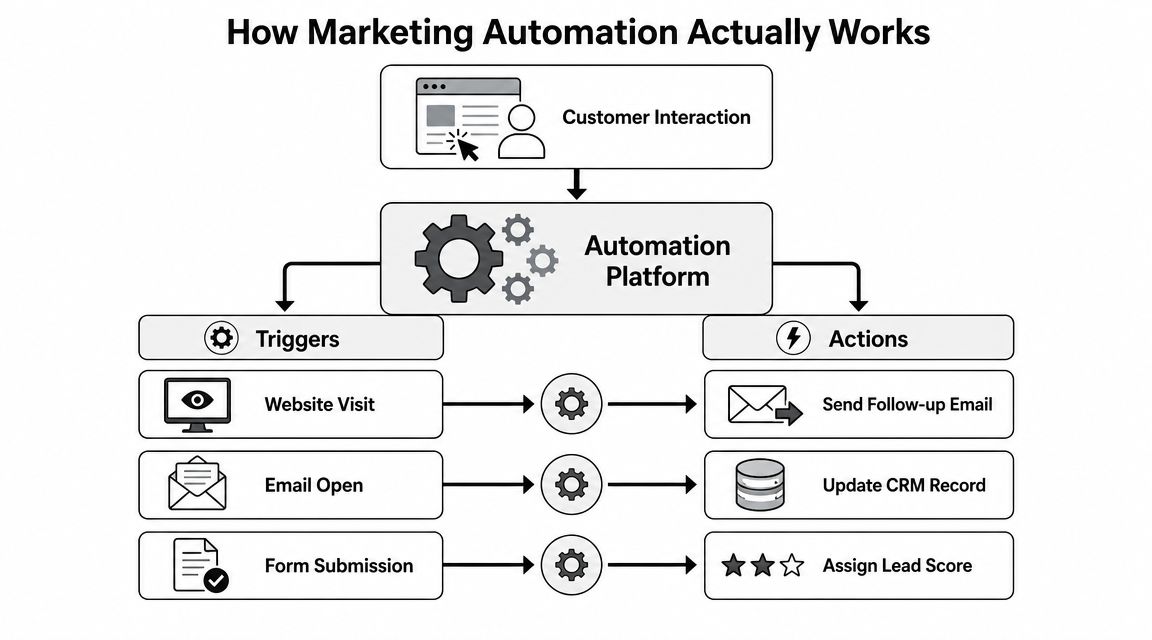
Marketing automation works like a digital assistant that follows clear instructions. A customer does something. The system recognises it. Then it carries out the next step you already decided should happen.
Think of it as a digital assistant with rules
The clearest way to understand what is marketing automation is to strip out the jargon. It isn't just email scheduling. It isn't posting on social media in advance. And it isn't a magic box that creates demand on its own.
It's a trigger-based workflow engine. HubSpot describes it as a model where a user action is captured and used to launch predefined messages, with value coming from the event model and decision rules that allow multi-step nurture journeys without manual intervention, as outlined in HubSpot's marketing automation overview.
In plain English, that means the system watches for events and follows rules.
The three parts that matter
Triggers
A trigger is the moment something happens.
Examples include:
- Form submission when someone asks for a quote
- Page visit when a visitor repeatedly checks a pricing page
- Email click when a lead engages with a service offer
- Booking action when a customer starts but doesn't complete a reservation
No trigger, no automation. If the business doesn't capture the action, the workflow has nothing to respond to.
Actions
An action is what the system does next.
That can include:
- Sending an email
- Updating a CRM record
- Assigning a task
- Adding someone to a list
- Notifying sales or reception
- Suppressing future sends if the person shouldn't receive them
The best actions are useful and specific. "Send generic newsletter" is weak. "Send the treatment prep guide after booking" is strong.
Workflows
A workflow is the sequence that links triggers and actions together over time.
A simple workflow might look like this:
| Step | Event or rule | Action |
|---|---|---|
| 1 | Visitor submits a quote form | Send confirmation email |
| 2 | Lead is tagged by service type | Assign to correct team member |
| 3 | No reply after a set delay | Send follow-up message |
| 4 | Lead clicks the follow-up | Flag as high intent in CRM |
The logic matters more than the channel. Email is only one output. The true value sits behind it, in the rules.
Good automation doesn't just send messages. It decides who should get what, when they should get it, and when they should be left alone.
What good workflows look like
Strong workflows are usually boring in the best possible way. They do the obvious thing reliably.
Weak workflows tend to have one of two problems:
- They're too simple to matter. For example, a single autoresponder that never changes based on behaviour.
- They're too complex to maintain. For example, a huge branching journey full of edge cases nobody reviews.
For most SMEs, the sweet spot is a short sequence tied to a high-intent moment. New enquiry. Abandoned booking. Follow-up after purchase. Review request after service delivery.
If you're choosing between sophistication and reliability, choose reliability first.
Real-World Automation Examples for UK Businesses
Local businesses don't need automation because they want fancy dashboards. They need it because admin piles up, response times slip, and customers expect follow-up to be immediate.
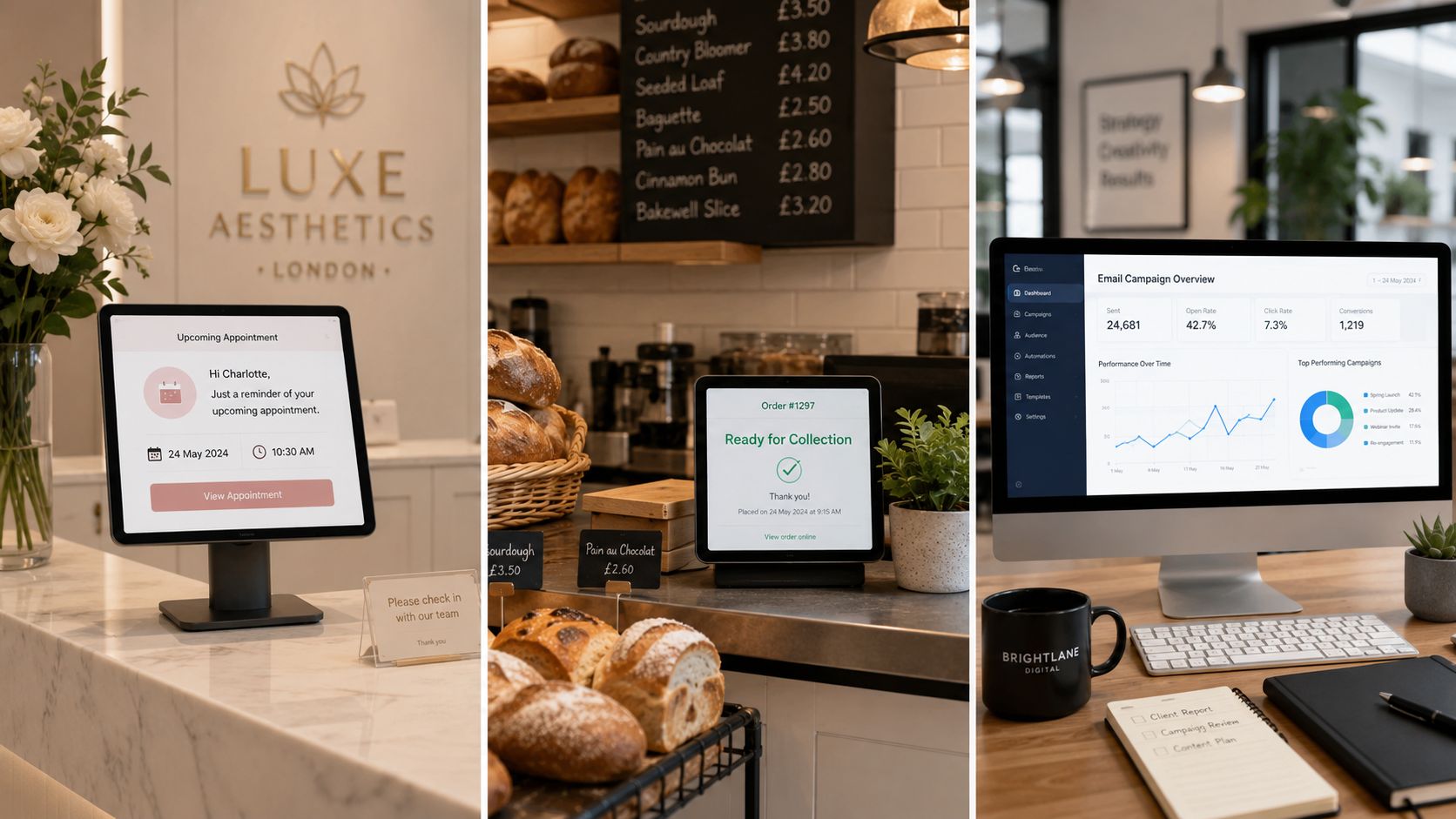
IBM's overview of the space highlights an important gap in how this topic is usually discussed. Many UK SMEs in clinics, hospitality, and trades need automation that drives bookings, quote requests, and local reviews, not just MQLs. It also raises the right practical question: when does automation reduce admin and improve bookings, and when does it just add complexity? That's covered well in IBM's marketing automation perspective.
A clinic that needs bookings to show up
An aesthetic clinic usually has a predictable bottleneck. Enquiries come in steadily, but the customer journey between "I'm interested" and "I've arrived for treatment" can break in several places.
A solid workflow might start when someone requests a consultation. The system sends a confirmation email, logs the enquiry in the CRM, and alerts the clinic team. If the person books, the workflow switches to reminders and pre-appointment information. After the visit, it can request feedback or a review.
That does three things well:
- Cuts delay at first contact
- Reduces manual chasing before appointments
- Creates a repeatable post-visit follow-up
If the clinic already uses email marketing for small business growth, automation turns those one-off sends into a timed process linked to actual behaviour.
A bakery that sells online and locally
A bakery with online ordering doesn't need enterprise nurture funnels. It needs practical recovery and repeat-purchase logic.
Someone adds a celebration cake to the basket, gets distracted, and leaves. Without automation, that sale is gone unless they remember to come back. With automation, the bakery can send a helpful reminder, reinforce collection details, and bring the customer back to the order.
Then there are existing customers. A buyer who ordered birthday cupcakes once is a strong candidate for future seasonal offers, local promotions, or reminders around key dates they previously ordered for. The point isn't to bombard them. It's to stay relevant.
A roofer that can't afford slow follow-up
Trades businesses often lose work in a quieter way. The lead came in. The form worked. But the follow-up was slow, inconsistent, or missing key detail.
For a roofing company, automation can start the moment a quote request lands. The prospect gets an immediate acknowledgement. The office gets the details in a structured format. The lead is tagged by service type or area. If there's no reply from the prospect after the first contact, the system sends a polite follow-up.
That workflow won't close every job. It will stop warm leads from being ignored.
The first automation local businesses should build is usually the one that protects demand they've already paid to generate.
The Measurable Business Benefits of Automation
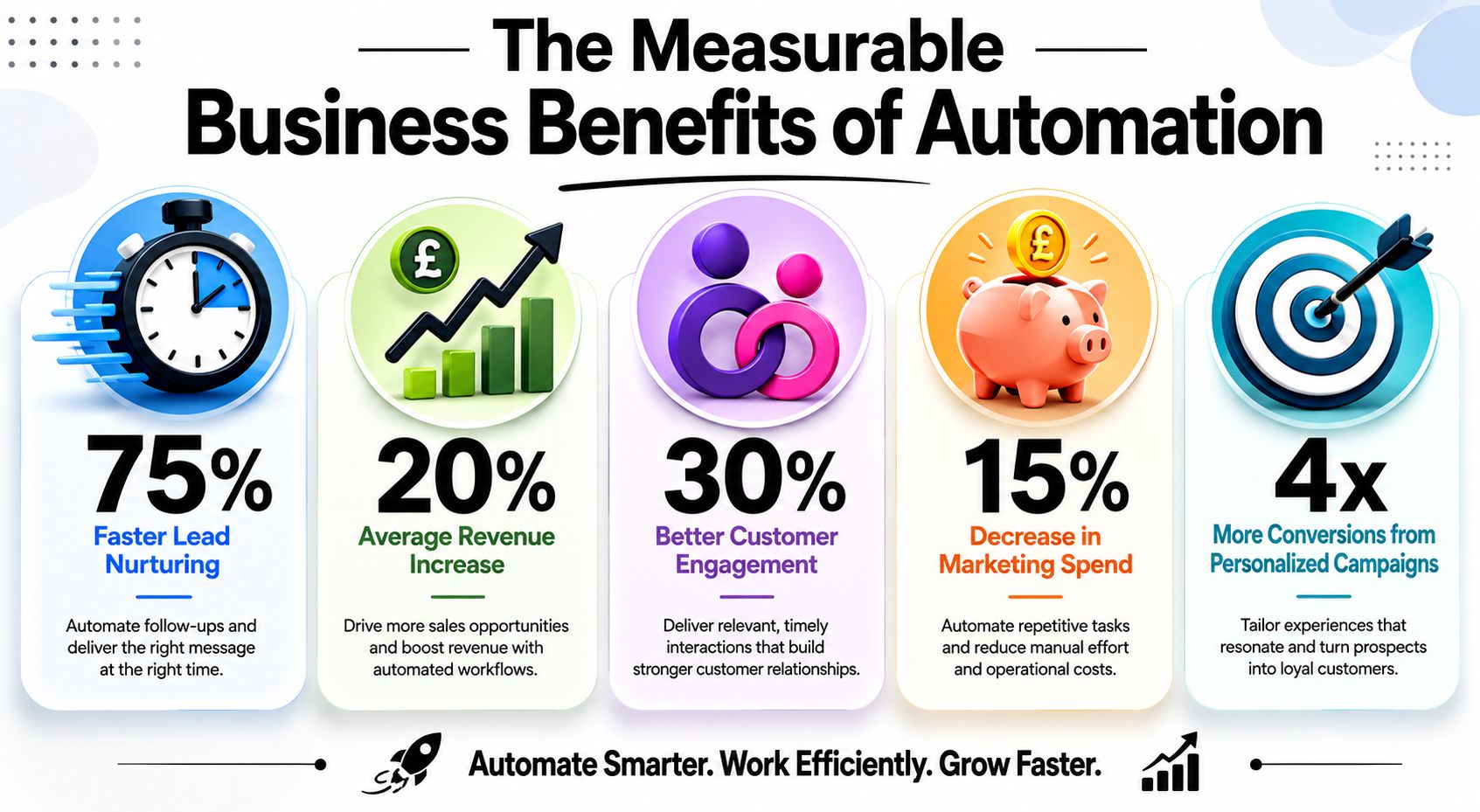
The benefit most owners notice first is time saved. That's real, but it's not the main reason to invest. The primary case for automation is commercial. It improves follow-up, creates consistency, and makes it easier to tie marketing activity back to booked work and revenue.
Why the returns can be real
There is hard evidence that marketing automation can produce meaningful returns. Nucleus Research found an average return of $5.44 for every $1 spent on marketing automation, and broader market estimates place the global sector at $6.65 billion in 2024, projected to reach roughly $15.6 billion by 2030 at a 15.3% CAGR, according to these marketing automation ROI and market figures.
For SMEs, that doesn't mean every tool will pay back automatically. It means the category has matured because businesses can justify it when the setup is tied to revenue, not novelty.
A second reason the business case has strengthened in the UK is compliance. The same source notes that the Data Protection Act 2018 and the GDPR framework, which came into force in May 2018, pushed organisations to formalise consent, preference management, and unsubscribe logic inside automated workflows. In other words, automation became part growth system and part governance system.
Here's a useful explainer on how automation supports paid acquisition and lead handling alongside Google Ads management for lead generation.
Where SMEs usually see the gain
This video gives a practical view of where automation fits in a growth system:
The biggest gains usually show up in a few places:
- Lead response speed. Prospects hear back quickly instead of waiting for someone to clear the inbox.
- Conversion consistency. Every lead gets the same baseline standard of follow-up.
- Repeat business. Existing customers can be prompted at sensible moments without manual list-pulling.
- Attribution clarity. Teams can see which channels and journeys produce actual enquiries or bookings.
A local business doesn't need dozens of automations to feel the effect. One workflow tied to a valuable customer action can clean up a surprising amount of leakage.
Worth remembering: software doesn't create demand by itself. It makes the demand you already generate easier to convert.
Your First Steps to Automation A Pragmatic Checklist
Most failed automation projects don't fail because the software was too weak. They fail because the business tried to automate chaos.
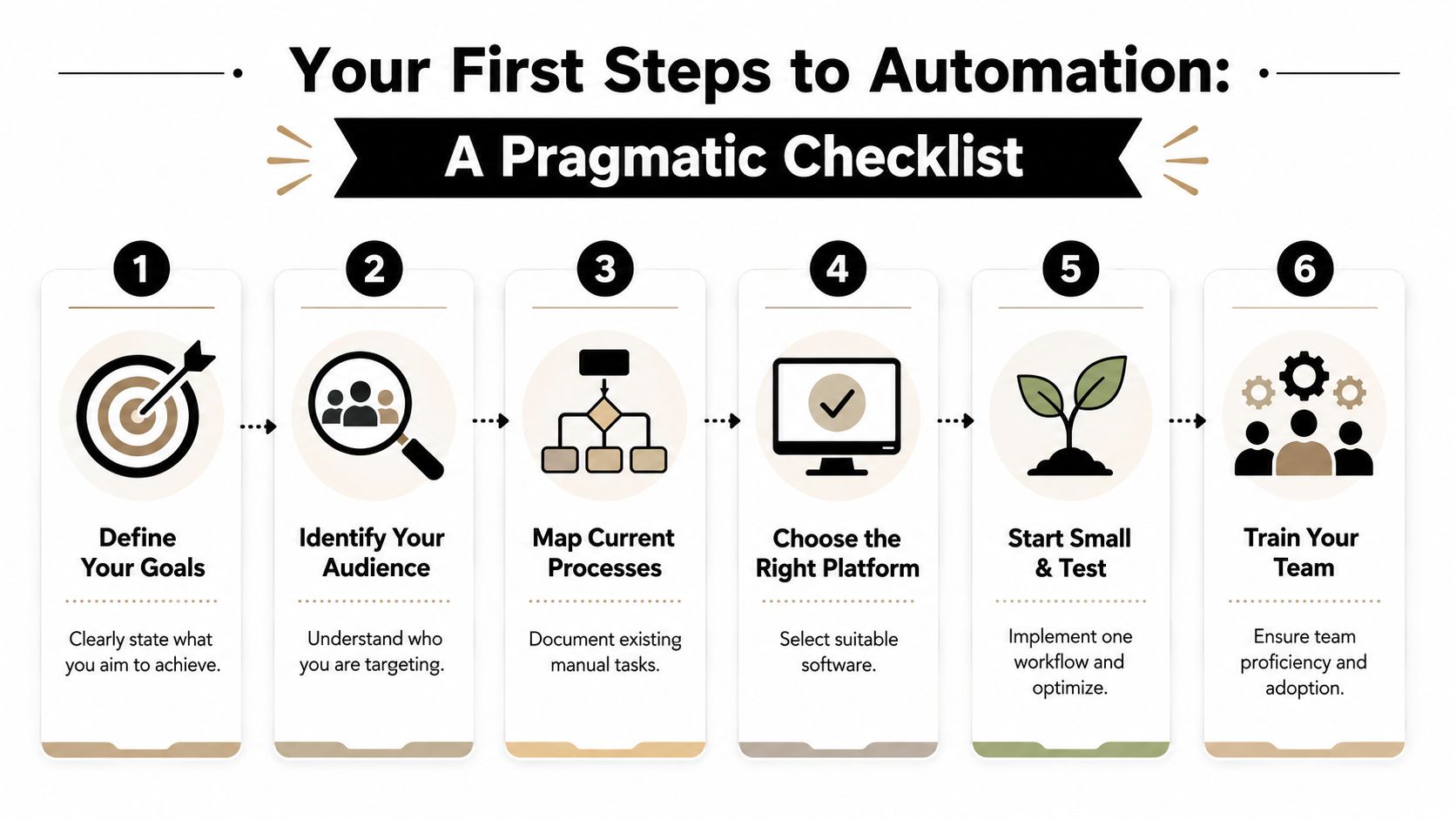
Start with one commercial problem
Don't begin with a tool. Begin with a moment in the customer journey that is costing you money.
A better starting list looks like this:
Choose one outcome
Pick a target that matters commercially. For example, every web enquiry gets an immediate acknowledgement and a prompt internal handoff.Map the manual process
Write down what happens now. Who receives the lead? Who replies? What information is missing? Where does the delay happen?Check the data you'll rely on
If names, emails, booking status, or service types are inconsistent, the workflow won't behave properly. Bad inputs create bad automation.
Build with consent and control in mind
For UK businesses, this part isn't optional.
Salesforce's guidance makes the architecture point clearly. Marketing automation is most effective when it's integrated with consent and data-governance controls because UK campaigns must operate within GDPR and PECR rules. In practice, that means using permissioned first-party data, suppression lists, preference centres, and a defensible consent trail, as explained in Salesforce's guide to marketing automation architecture.
That changes how you build workflows. You shouldn't just ask what can be automated. You should ask whether the business has the right basis, permissions, and record-keeping to automate it responsibly.
A practical checklist:
- Use clear consent capture so you know what the person agreed to
- Maintain suppression lists so opted-out contacts stay excluded
- Keep preference options visible if people want fewer or different messages
- Record workflow logic so your team understands what fires and why
Launch one workflow and inspect it closely
Once the process and data are in good shape, build something small and high value.
Good first candidates include:
- New web enquiry follow-up
- Booking confirmation and reminder flow
- Quote request acknowledgement
- Post-service review request
Then test it properly.
| Checkpoint | What to verify |
|---|---|
| Trigger | Does the workflow fire at the correct moment? |
| Data | Are fields passed into the email or CRM accurately? |
| Timing | Are delays sensible for the customer and team? |
| Compliance | Are opted-out contacts correctly excluded? |
| Ownership | Does someone review results and exceptions? |
Most businesses don't need an advanced stack on day one. They need a stable first workflow, clear ownership, and a reason to keep improving it.
Common Pitfalls and Realistic ROI Expectations
Automation gets oversold when people talk about it like a switch you flick once. In practice, it behaves more like an operating system. It needs clean inputs, sensible rules, and regular review.
Why some setups disappoint
The most common mistake is overbuilding too early. A business with patchy data and no clear follow-up process doesn't need a sprawling automation map. It needs one workflow that solves one obvious problem.
Other failure points show up quickly:
- Bad data means emails go to the wrong people, fields populate incorrectly, or leads get misrouted.
- Set-and-forget behaviour means nobody notices broken triggers, outdated messaging, or irrelevant follow-ups.
- Poor fit software creates friction if the platform is too complex for the team using it.
- No operational owner leaves the system floating between marketing, admin, and sales.
If nobody owns the workflow after launch, the workflow usually stops being useful long before anyone admits it.
What realistic expectations look like
Automation can improve speed, consistency, and visibility fairly quickly. That doesn't mean every workflow produces instant profit.
The sensible expectation is gradual compounding. You launch one process, check where contacts drop out, tighten the messaging, improve the trigger logic, and remove friction. Then the returns improve because the workflow becomes more relevant and more reliable.
That matters for local businesses. A clinic doesn't need a futuristic setup. It needs fewer missed consultations. A roofer needs follow-up that gets done. A bakery needs online buyers to complete the order and come back again. If the automation helps with those jobs, it's doing its work.
When to DIY vs Hire a Marketing Partner
DIY makes sense when the workflow is narrow, the stakes are low, and your systems are simple. A welcome email, a booking confirmation, or a basic enquiry acknowledgement can often be built in-house if someone on the team has the time to maintain it properly.
Hiring a partner makes more sense when automation needs to connect multiple parts of the business. Website forms, CRM, paid traffic, email logic, lead routing, reporting, and conversion tracking rarely work well when they're stitched together casually. That's where strategy matters more than software.
A good decision rule is simple:
- DIY it if you need one straightforward workflow and can own it internally.
- Bring in a specialist if the process touches revenue-critical handoffs or several platforms at once.
If you're weighing that decision now, it's worth looking at marketing automation services for growing UK businesses.
If you want help building automation that improves enquiries, bookings, and revenue, BPE Digital can help you map the process, set up the right workflows, and connect your website, CRM, and marketing channels into a system that works in practice.